Semrush logo
  • Products

    Start Here

    • Semrush One
    • Enterprise
    • Features
    • Request a Demo
    • Talk to Sales

    Find the Right Tools

    • AI Visibility Toolkit
    • SEO Toolkit
    • Traffic & Market Toolkit
    • Content Toolkit
    • Local Toolkit
    • Social Toolkit
    • Advertising Toolkit
    • PR Toolkit

    Platform

    • Integrations
    • App Center
    • API
    • Data Sources

    Top Apps

    • AdClarity
    • Exploding Topics
    • Other apps
  • Pricing
  • Resources

    Grow with Semrush

    • Blog
    • Knowledge Base
    • Academy
    • Success Stories
    • AI Visibility Index
    • Webinars
    • News

    Explore Free Tools

    • AI Visibility Checker
    • SEO Checker
    • Website Traffic Checker
    • Keyword Tool
    • Backlink Checker
    • Top Websites by Traffic
    • Explore Other Free Tools

    About Semrush

    • About Us
    • Stats and Facts
    • Integrations
    • Affiliate Program
    • Contact us
  • Enterprise
Log InSign Up
  • News
  • Data & Insights
  • Company News
  • Product News
  • Press Kit
Search icon
Semrush logo
  • Products
  • Pricing
  • Resources
  • Enterprise
  • News
  • Data & Insights
  • Company News
  • Product News
  • Press Kit
Log InSign Up

Start Here

  • Semrush One
  • Enterprise
  • Features
  • Request a Demo
  • Talk to Sales

Find the Right Tools

  • AI Visibility Toolkit
  • SEO Toolkit
  • Traffic & Market Toolkit
  • Content Toolkit
  • Local Toolkit
  • Social Toolkit
  • Advertising Toolkit
  • PR Toolkit

Platform

  • Integrations
  • App Center
  • API
  • Data Sources

Top Apps

  • AdClarity
  • Exploding Topics

Grow with Semrush

  • Blog
  • Knowledge Base
  • Academy
  • Success Stories
  • AI Visibility Index
  • Webinars
  • News

Explore Free Tools

  • AI Visibility Checker
  • SEO Checker
  • Website Traffic Checker
  • Keyword Tool
  • Backlink Checker
  • Top Websites by Traffic
  • Explore Other Free Tools

About Semrush

  • About Us
  • Stats and Facts
  • Integrations
  • Affiliate Program
  • Contact us
Main page /Product News

Sellzone Upgrades The Listing Quality Score: Catch and Fix Your Most Critical Listing Errors

December 2, 2021
Sellzone Upgrades The Listing Quality Score: Catch and Fix Your Most Critical Listing Errors
Sellzone is very happy to announce that the Listing Quality Score (LQS) just got even better. The Listing Quality Score (LQS) is a compound score that grades the overall quality of a listing based on our optimization guidelines, Amazon's requirements, and the official Style Guide.

Previously, the LQS within the Listing Quality Check tool was calculated by giving each quality issue/check equal weight. In reality, Amazon views certain checks as more critical than others. In fact, some negative, critical checks can get sellers banned from Amazon if the user doesn't take swift action. 

In order to give a more accurate reflection of how Amazon views listings, we have updated the LQS to give different weights to different checks. This upgrade allows users to hone in on the most critical errors in their listings first. This focus on critical errors helps mitigate Amazon bans and will enable users' listings to achieve their most tremendous growth potential through better visibility. 

The Listing Quality Score includes five grades: 
  • Perfect - Listing passes all checks, meets all Amazon requirements, complies with the Style Guide, and follows all optimization recommendations.
  • Good - Listing has some minor issues but overall performs well.
  • Decent - Listing content has a significant number of issues and should be optimized.
  • Poor - Listing has a lot of issues and requires considerable revision.Bad - Listing needs an urgent overhaul.
Now, in addition to giving each listing an overall score, we divide checks into three categories: 
  • Critical - Major issues that seriously affect listing performance and can lead to suspension.
  • Recommended - Issues that should be sorted out for the best listing performance.
  • Optional - Minor problems that have little impact on listing performance. 
u2.png

How to Leverage the Listing Quality Score to Easily Manage Your Listings

1. Enter your listing’s URL or ASIN into the search box and click “Search” 
u3.png
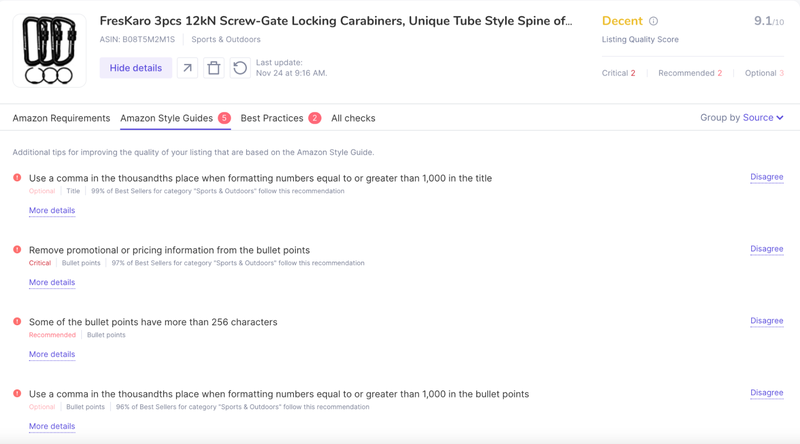
2. When the Listing Quality Check tool has populated your listing, there are several vital pieces of information to look at (see the image below): 
  • The right-hand corner shows the overall listing score and shows how many checks you have in each of the three designated categories (Critical, Recommended, Optional).
  • When you click "More details," you'll get an in-depth look at each identified check.   
  • If you disagree with the identified checks, you can hit "Disagree" to dismiss the check.
  • The checks are broken out into Amazon Requirements, Amazon Style Guides, Best Practices, and all checks. You can click on each to see that specific check category. 
  • If you would like to remove the listing altogether, click the trash can button.
3. Newly improved Listing Quality Score is broken down into three categories which are labeled under each issue identified by the tool. 
4. Using the new weighted formula, you'll be able to better assess what listings are in dire need of improvement and which are performing well and don't require as much upkeep. The LQS helps you save time and helps prevent critical errors from causing a listing removal, or worse, a ban from Amazon. 
u4.png
Start managing your listings today
Listing Quality Check tool

About Semrush

Semrush is a leading online visibility management SaaS platform that enables businesses globally to run search engine optimization, pay-per-click, content, social media and competitive research campaigns and get measurable results from online marketing. Semrush offers insights and solutions for companies to build, manage, and measure campaigns across various marketing channels. Semrush, with over 91,000 paying customers, is headquartered in Boston and has offices in Philadelphia, Trevose, Austin, Dallas, Amsterdam, Barcelona, Belgrade, Berlin, Limassol, Prague, Warsaw, and Yerevan.

Download as

PDF
DOCX

Share

Relevant news

Semrush Expands AI Visibility Database To 32 Countries, With 17 New Regional Markets

Global coverage expansion now provides international teams with real AI search data for previously unmeasured markets, growing the Semrush prompt database to more than 261 million LLM prompts.
Product News
May 14, 2026

Semrush Announces Partnership With Lovable, Bringing Search Intelligence Into The Building Experience

In a new partnership with Semrush, all Lovable users will have access to Semrush’s search intelligence natively inside the building experience, so founders can create projects for brand visibility and growth from the outset.
Product News
May 13, 2026

Enterprise AI Optimization Adds New Source & Sentiment Analysis Automations

New Reddit and Negative Sentiment Analysis capabilities give brands deeper visibility into the sources shaping their perception in AI search.
Product News
May 7, 2026

Get started with Semrush today

Try Semrush free for seven days. Cancel anytime.

Start free trial
  • Semrush One
  • Features
  • Pricing
  • Free Trial
  • Compare Semrush
  • Success Stories
  • Stats and Facts
  • Affiliate Program
  • Enterprise SEO
  • Enterprise AIO
  • Enterprise SI
  • Insights24
  • Mfour
  • App Center
  • Top Websites
  • Free Tools
  • Sensor
  • About Us
  • News
  • Careers
  • Partners
  • Semrush Select
  • Global Issues Index
  • Contact us
  • Knowledge Base
  • Academy
  • API
Community
  • Semrush Blog
  • Webinars
  • Ambassador Program
LinkedInInstagramTikTokYouTubeFacebookX
Adobe logo© 2026 Semrush Holdings. All rights reserved.
Privacy PolicyTerms of ServiceCookies Settings
Semrush